Your phone and laptop choices shape how your day runs. This ranking highlights useful tools for everyday digital life that cut friction. You will focus on tools that prevent lockouts, loss, and confusion.
Each pick is ranked by risk reduced and recovery speed. You will also get quick setup guidance for busy schedules.
These recommendations fit personal use, school, and remote work. The goal is a smaller toolkit with reliability. Start with the issue that costs you the most time.

How This Ranking Measures Everyday Digital Use In Real Life
A good ranking starts with clear rules, because digital problems stack fast. You want tools that keep working when you switch devices or lose a file.

Real life digital risk includes mistakes, outages, and time pressure. This guide scores each tool on usefulness, setup effort, and stability.
It checks whether you will keep using it after a week. Rank five is a news tool because misinformation drives bad choices.
The Five Risk Types You Face Daily
Most daily problems fall into five buckets: access, data loss, privacy exposure, confusion, and misinformation. Access issues show up as locked accounts, failed codes, or device changes.
Data loss hurts most when your photos, documents, or receipts disappear without warning. Privacy exposure includes tracking, leaked logins, and overshared messages.
Confusion happens when links, files, and notes scatter across apps. Misinformation shows up as misleading headlines that affect decisions and spending.
What “Useful” Means When You Are Under Pressure
A tool is useful when it works even on your worst day. That means it needs low setup, clear menus, and strong defaults. Recovery speed matters because you do not want to research fixes for hours.
We also weigh whether support articles are easy to follow and updated. Free tiers can rank well if limits do not break daily use. Paid plans rank higher only when they prevent expensive mistakes.
Microsoft Authenticator For Safer Access On Any Device
Rank four is Microsoft Authenticator, because account access is your foundation. When you lose access, you lose time, money, and sometimes your identity.
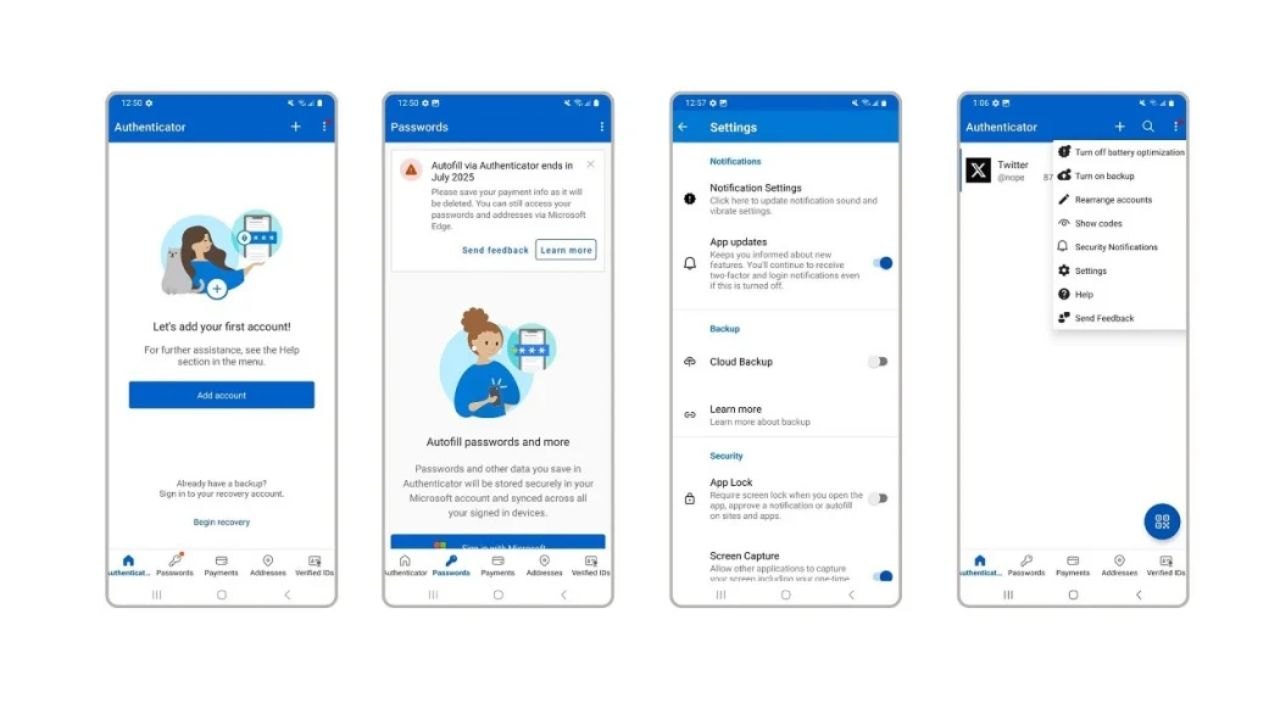
Two factor security reduces the damage of reused passwords and phishing attempts. Authenticator apps also speed up sign-ins when codes are required.
This pick scores high for reliability and clear setup. If you add one security layer this week, start here.
Why Passwords Alone Break Down
Passwords fail in predictable ways, even for careful people. You reuse them, you forget them, or a site gets breached. Phishing works because fake login pages look real on small screens.
An authenticator adds a second proof that a stolen password cannot replace. It also reduces reliance on SMS codes, which can be intercepted or delayed. That extra step is small, but it blocks many common account takeovers.
A Setup Flow You Will Actually Keep
Setup only works if you keep it simple and consistent every time. Turn on app verification for your email first, because it controls resets. Add banking next if your bank supports app based verification.
Store backup codes somewhere you can access without your phone in emergencies. Lock the authenticator with face or fingerprint unlock and a device passcode. After setup, test one login so you trust the flow under pressure.
Handling A New Phone Without Getting Locked Out
A new phone is where security setups often fail, so plan ahead. Before you upgrade, back up or export your authenticator accounts if possible. Keep your old phone until you confirm your new sign-ins work.
If you cannot transfer codes, use backup codes to re-enroll accounts. Start with email and cloud storage, then move to shopping and subscriptions. This slower step once prevents painful lockouts later.
Backblaze Backup For File Recovery After Disasters
Rank three is Backblaze Backup, because data loss is hard to reverse. Cloud sync helps, but it is not the same as a true backup.

Automatic protection matters because manual backups rarely happen on busy weeks. Backblaze runs quietly and backs up your files online.
If your drive fails or your laptop is stolen, you can restore what you lost. This ranks high because it protects files you cannot replace.
What A Real Backup Must Do
A true backup must be automatic, versioned, and easy to restore. Automatic means it keeps working after updates and reboots. Version history helps when you delete a file or save over it.
Restore options matter, because you might need a few files or everything. Backblaze keeps setup simple, so you do not babysit folder choices. That simplicity is why you keep using it long after week one.
Backup Versus Sync: Why Both Matter
Sync tools mirror changes, which can hurt you during accidents. If ransomware encrypts a synced folder, the bad version can spread. Backups are a safety net because they keep older versions you can restore.
Backblaze is built for recovery, not just sharing across devices. It works well for large libraries like photos, projects, and archives. Use sync for collaboration, but treat backup as your last defense.
Restoring Fast After A Device Failure
If your laptop dies, your priority is getting critical files back fast. Backblaze lets you restore by download, and sometimes by shipped drive. Start with essentials like IDs, tax files, client work, and school documents.
Next, restore personal media like photos and videos, which are hard to recreate. After recovery, list what was missing and adjust your storage habits. That review makes your backup more complete over time.
Top Picks For Clarity And Clean Communication Every Day
The top two tools reduce daily confusion and keep communication clean. Confusion is lost links, repeated searches, and forgotten decisions.

Clean communication matters because messy threads create conflict and delays. These picks work together: one organizes what you find, and one protects what you share.
They also help you separate personal and task focused conversations. If you want the biggest daily impact, start with these.
Raindrop For Saving And Finding Anything
Rank two is Raindrop, a bookmark manager that keeps your web life organized. It saves articles, product pages, tutorials, and receipts in searchable collections. Searchable saving beats screenshots because you can find what you need later.
Use tags for projects like travel, budgeting, repairs, or home upgrades. It works across devices, so you save on mobile and retrieve on desktop. This ranks high because it reduces repeated work and fatigue.
Wire For Private Conversations That Stay Reliable
Rank one is Wire, a secure messaging app built for private, reliable conversations. It supports encrypted chats and calls, and it works across devices. Privacy reduces risk when you share addresses, documents, or sensitive plans.
Wire helps you separate personal chats from coordination with small groups. Use it for family logistics, school projects, or any conversation you want protected. It earns the top spot because communication drives daily digital life.
A Simple Two Tool Workflow You Can Keep
Use Raindrop as your capture layer, and Wire as your sharing layer. When you find a useful page, save it with a tag and note. Share the clean link through Wire when someone needs it.
That keeps threads readable and reduces arguments about what was agreed on. Once a week, review new saves and archive what you do not need. This workflow turns scattered browsing into a reliable personal system.
Conclusion
Digital tools matter when they reduce stress in real situations. This list of useful tools for everyday digital life focuses on risk and recovery.
Start with one tool and finish setup in one sitting. Use it for a week, then add the next tool you need. A small toolkit beats a folder of unused apps.